
Tech
Step-by-Step Guide on How to Block Annoying Ads/Pop-Ups on Movie Sites
If you’re tired of intrusive ads and fake “Download” buttons when trying to stream or save your favorite movies, this guide will show you a simple way to block pop-ups and stay safe online.

- If you’re tired of intrusive ads and fake “Download” buttons when trying to stream or save your favorite movies, this guide will show you a simple way to block pop-ups and stay safe online — no extra app required.
The Frustration of Movie Site Pop-Ups
If you love downloading or streaming movies online, you already know the struggle. The moment you click on a site, boom!—a flood of pop-ups appears. Some open several new tabs at once, while others flash alarming messages like “Your device is infected!” or “You’ve won a prize!”
These ads are not just annoying—they can be dangerous. Many are designed to steal your data, install malware, or slow down your device. But here’s the good news: with one quick change in your phone settings, you can block all those intrusive ads and enjoy a clean, safe browsing experience.
Why Movie Sites Are Flooded with Ads
Most so-called “free movie download sites” earn money through advertising. Every click on an ad earns the site owner a small commission. That’s why you’ll see pages crowded with banners, redirects, and fake “Download” buttons.

Unfortunately, many of these ads come from unverified or malicious networks that spread spyware, phishing links, or harmful downloads. So, if you’ve noticed weird notifications or your phone suddenly heating up after visiting a movie site—this is likely the cause.
Blocking these ads doesn’t just make browsing smoother; it helps protect your personal data and improves device performance.
Step-by-Step: How to Block Annoying Ads/Pop-Ups on Movie Sites
This method works on most Android phones and doesn’t require installing any third-party app. Here’s how to do it:
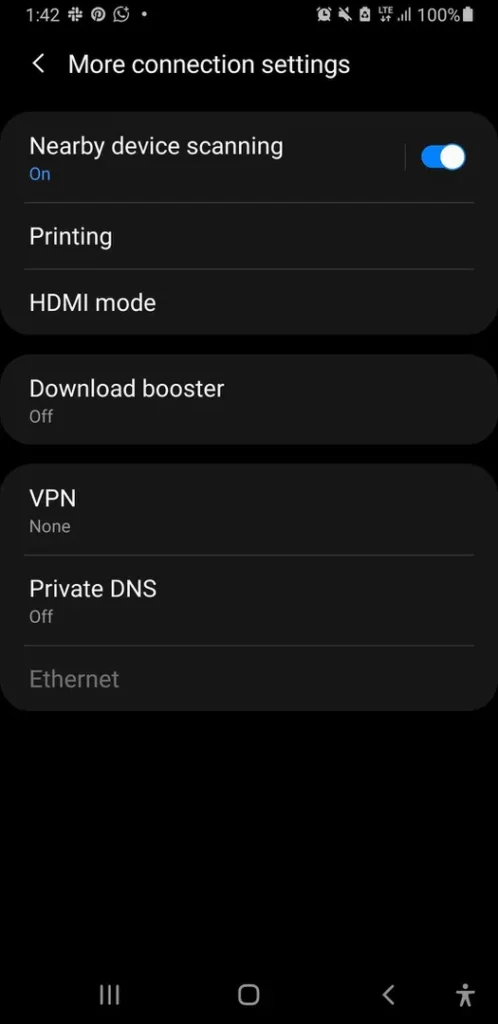
- Go to your Phone Settings.
Open the Settings app on your device. - Tap “Connections.”
This section manages how your phone connects to Wi-Fi and mobile networks. - Select “More Connection Settings.”
Scroll to find options related to network configuration. - Choose “Private DNS.”
The Domain Name System (DNS) acts like the phonebook of the internet — it connects you to websites.
Changing it lets your phone block ad and malware servers automatically. - Enter a secure DNS address:
dns.adguard.comordns.cloudflare.com(Both options filter out ads and block malicious pop-ups.)
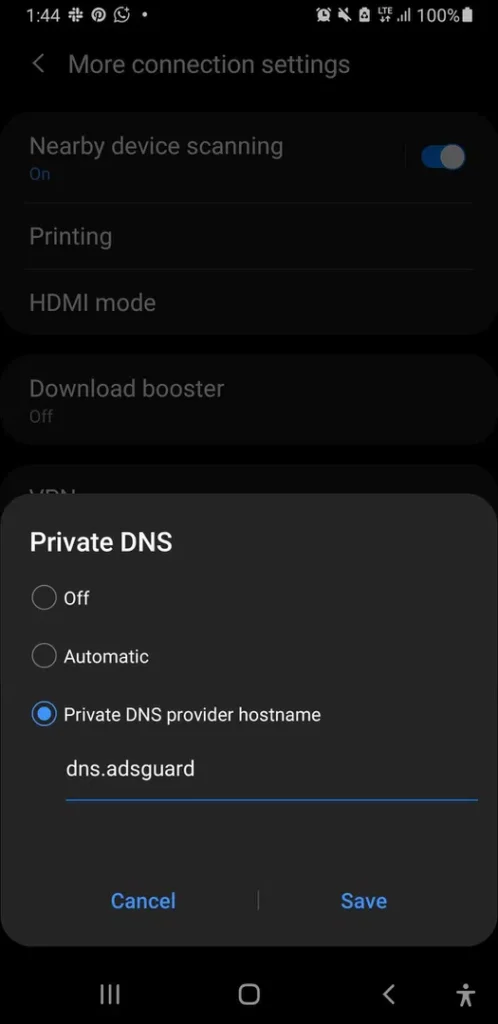
- Save and exit.
That’s it. You can now browse, stream, or download movies without annoying pop-ups or fake warning messages.
How This Works
DNS acts as the bridge between your phone and the web. Normally, your internet provider controls it. By switching to a secure DNS provider, your phone routes traffic through servers that automatically block suspicious and ad-filled domains.
DON’T MISS: Warning: Your Phone Might Be Making You Sick — Literally
- AdGuard DNS filters ads, trackers, and adult content.
- Cloudflare DNS improves privacy, speed, and security.
These services block harmful domains before they even load, keeping your browsing fast, private, and ad-free.
Extra Tips to Stop Pop-Ups Permanently
- Use a browser with built-in ad blocking.
Browsers like Brave, Opera, and Firefox automatically block intrusive ads and tracking scripts. - Avoid suspicious movie sites.
If a website looks cluttered or asks you to install something before you can watch, it’s likely unsafe. Stick to trusted platforms like Netflix, Showmax, or YouTube Movies. - Clear your browser cache regularly.
Old cookies or trackers can keep serving unwanted ads. Go to Settings → Privacy → Clear Browsing Data on your browser to keep it clean and fast.
What to Do If You Clicked a Bad Ad
Accidents happen. If you’ve already clicked a suspicious link or pop-up:
- Close the tab immediately.
- Run a Google Play Protect scan or your phone’s antivirus.
- Clear your browser data.
- Change your passwords, especially if you logged in around that time.
- Avoid installing random APKs prompted by movie sites — they often contain malware.
- Free movie sites might seem convenient, but their aggressive ads and pop-ups can turn your movie night into a cybersecurity nightmare.
The Private DNS method above gives you a simple, safe, and permanent fix — no extra apps, no tech jargon. Once you set it up, you can browse and stream freely without interruptions, redirects, or fake warnings.
So the next time you sit down to enjoy your favorite movie, you can do it in peace — ad-free and worry-free.





FG’s ₦50,000 Relief: 5 Things to Check Before You Accept a Payment Message
Received a message about the FG’s ₦50,000 relief? Check these five details before responding, sharing information or attempting to collect...


‘There Is No Shaking’ — Atiku Reveals Next Move After Court Voids His ADC Presidential Ticket
Atiku has vowed to challenge the court judgment nullifying the David Mark-led ADC leadership and his presidential nomination, urging supporters...


BREAKING: Cristiano Ronaldo Retires From International Football
Cristiano Ronaldo has announced his retirement from international football, saying he will hand back Portugal’s No. 7 shirt after the...


BREAKING: Court Nullifies Atiku’s 2027 Presidential Candidacy
The Federal High Court in Abuja has nullified the Senator David Mark-led ADC caretaker committee and invalidated actions taken under...


Medipool: Pharmacists Challenge FG’s Drug Supply Arrangement, Demand Public Oversight
Medipool has come under criticism from the Pharmaceutical Society of Nigeria, which wants stronger public oversight and legal safeguards for...


Emergency Treatment: Senate Advances Bill Proposing Jail Terms for Delays
An emergency treatment bill proposing penalties for delays in care has passed second reading in the Senate, as lawmakers debate...


NIN Project: FG Seeks One-Year Extension as $196 Million Remains Unused, Issuance Falls Short
Nigeria’s NIN project faces a proposed extension to December 2027, with approximately $196 million undisbursed and identification issuance below target.

NNPC Posts ₦509 Billion September Profit as Revenue Hits ₦4.61 Trillion
NNPC reported ₦509 billion in profit after tax for September 2026, alongside ₦4.61 trillion in revenue and a modest increase...


FG Connects Teachers with Students, Promises Free Data
Inspire Live will connect pupils to interactive online lessons with free data access, Education Minister Tunji Alausa says, as the...


BOI Signs $50 Million IFC Loan Deal, Reserves 25% for Women-Owned Businesses
BOI has signed a $50 million loan agreement with IFC to expand financing for Nigerian small businesses, with at least...