
Tech
How to Recover a Hacked WhatsApp Account Before It’s Too Late
Here is a step-by-step guide on how to recover a hacked WhatsApp account before it is too late.

- Here is a step-by-step guide on how to recover a hacked WhatsApp account before it is too late.

WhatsApp is one of the world’s most popular messaging apps, making it a common target for hackers. If someone gains access to your account, they may impersonate you, scam your contacts, or attempt to steal sensitive information.
If you suspect your WhatsApp account has been hacked, don’t panic. Acting quickly can help you recover your account and prevent further misuse.
Signs Your WhatsApp Account Has Been Hacked
You may notice:
- You have been unexpectedly logged out.
- You receive a verification code you did not request.
- Friends say they received suspicious messages from you.
- Unknown devices appear linked to your account.
- Your profile photo, name, or status has changed without your knowledge.
Step 1: Log Back Into WhatsApp
Open WhatsApp and register your phone number again.
WhatsApp allows only one active session on a phone number. Registering your number again will automatically log out anyone using your account on another phone.
Step 2: Enter the Verification Code
Request a new six-digit verification code.
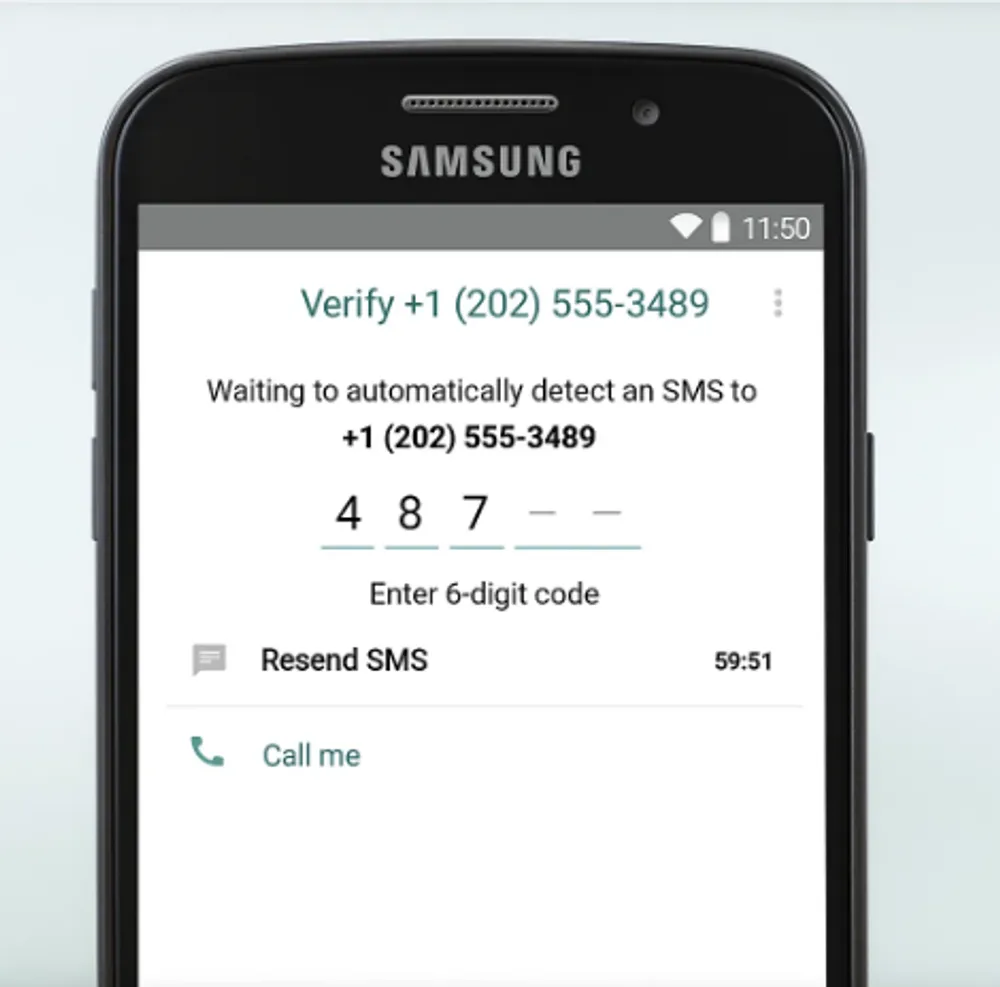
Only enter the code inside the official WhatsApp app.
Never share this code with anyone claiming to be customer support or a friend.
Step 3: If Two-Step Verification Is Enabled
If the hacker enabled two-step verification, you may need to wait before registering again if you do not know the PIN.
If you previously set a recovery email, use it to reset the PIN.
Step 4: Check Linked Devices
After regaining access:
Settings → Linked Devices
Remove every device you do not recognize.
Step 5: Inform Your Contacts
Hackers often ask friends and family for money.
Send a message informing your contacts that your account was compromised and advise them to ignore any suspicious requests.
Step 6: Secure Your SIM Card
If you suspect someone transferred your phone number to another SIM card, contact your mobile network immediately.
Request that your SIM be secured or replaced if necessary.
How to Enable Two-Step Verification
Open:
Settings → Account → Two-Step Verification
Create a secure PIN and add a recovery email address.
This significantly improves account security.
How to Avoid WhatsApp Hacks
- Never share verification codes.
- Ignore suspicious links.
- Keep WhatsApp updated.
- Enable device screen locks.
- Be cautious of fake customer support messages.
- Only download WhatsApp from official app stores.
Frequently Asked Questions
Can someone hack my WhatsApp without the verification code?
It is much more difficult. Most successful account takeovers involve users sharing verification codes or losing control of their phone number.
Can I recover deleted chats?
If you have cloud backups enabled, you may be able to restore recent messages during setup.
The faster you act, the greater your chances of recovering your WhatsApp account. Re-register your phone number immediately, secure your SIM card, remove unknown linked devices, and enable two-step verification to reduce the risk of another compromise.






IPOB Embraces Hausa Nation and All Northern Ethnic Nationalities in Historic Solidarity Declaration for Universal Freedom
IPOB has declared solidarity with Hausa people and other ethnic nationalities in Northern Nigeria, calling for a peaceful...


Nnamdi Kanu’s Legal Team Raises Fresh Questions Over Omotosho’s Judgment in Part 3 Commentary
Onyedikachi Ifedi, Esq., has questioned the legal basis of Nnamdi Kanu’s conviction, alleging irregularities involving Count 7....


IPOB Denies Plans to Resume Monday Sit-at-Home, Rejects Alleged Police Intelligence Report
IPOB has dismissed a purported police intelligence report alleging plans to resume Monday sit-at-home enforcement in the South-East...


‘No Negotiations, Only Referendum’ — Kanu’s Message to American Veterans of Igbo Descent
IPOB leader Nnamdi Kanu has reaffirmed his demand for a referendum on Biafra's self-determination, insisting he will reject any political...


IPOB Condemns NYSC Abductions in Imo, Accuses Uzodinma of Political Conspiracy
IPOB has condemned the reported abduction and rescue of NYSC members in Imo State, denying involvement and accusing Governor Hope...


Ambrose Alli University Lecturer Dies in Hotel Room After Sexual Encounter With 21-Year-Old Woman
A senior lecturer at Ambrose Alli University, Ekpoma, Dr Matthew Uwuigbe, has died in a hotel room in Edo State...


Omotosho’s First Jurisdictional Failure — The Court Lacked Authority to Try Kanu
The Mazi Nnamdi Kanu Global Legal Consortium has alleged that the Federal High Court lacked jurisdiction to try Kanu on...


‘No Government Without a Country’: IPOB Rejects Self-Appointed Biafra Government Officers
Mazi Chris Nwaọgụ has reiterated IPOB’s demand for Nnamdi Kanu’s freedom and Biafra’s restoration, while calling for Kanu’s appeal to...


Sokoto Declaration: Emma Powerful Dismantles False Claims, Reaffirms Onyendu Mazi Nnamdi Okwu Kanu’s Referendum Position
Kanu’s camp has rejected claims that he did not approve or co-sign the Sokoto Declaration, while stressing that he does...


Kanu’s Unlawful Conviction, the Law That Was Already Dead, and the Shame That Is Waiting for Nigeria’s Judiciary
Christopher Chidera, Esq., has challenged the legal basis of Nnamdi Kanu’s conviction, arguing that the trial court relied on a...