
Tech
Unlocking Creativity: A Guide to YouTube Video Editing Tutorials and Software Recommendations
YouTube video editing is a multifaceted process that involves creativity, technical skill, and attention to detail.

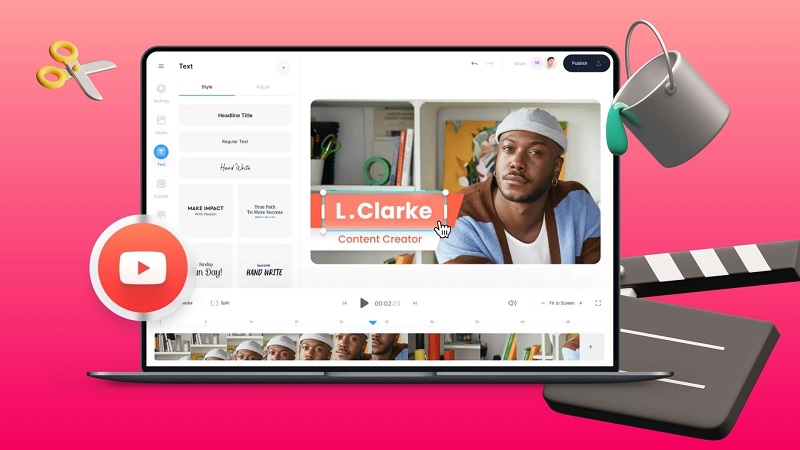
YouTube video editing is a multifaceted process that involves creativity, technical skill, and attention to detail.
In the vast ocean of digital content, video reigns supreme as the medium of choice for creators to express themselves, share stories, and connect with audiences worldwide. Behind every captivating YouTube video lies a meticulous process known as video editing, where raw footage transforms into polished, engaging content.
In this article, we embark on a journey through the realm of YouTube video editing tutorials and software recommendations, shedding light on this essential craft and providing guidance for aspiring creators.
Understanding Video Editing:
Video editing is the art of assembling, arranging, and refining video footage to convey a message, evoke emotions, or entertain viewers. It involves a series of creative decisions, technical manipulations, and storytelling techniques aimed at enhancing the visual and auditory elements of a video. From trimming and rearranging clips to adding effects and transitions, every edit contributes to the overall narrative and impact of the content.
At its core, video editing is about storytelling. It’s about selecting the right shots, pacing the sequence effectively, and crafting a cohesive narrative arc that captivates and resonates with the audience. Whether it’s a short vlog, a tutorial, or a cinematic masterpiece, the editing process plays a pivotal role in shaping the viewer’s experience and conveying the creator’s message.
YouTube Video Editing Tutorials:
In the dynamic landscape of online content creation, knowledge is key, and YouTube serves as a treasure trove of tutorials, guides, and tips for aspiring video editors. From basic editing techniques to advanced effects and workflows, there’s a tutorial for every skill level and niche interest.
YouTube video editing is the process of refining raw footage into polished, engaging content suitable for uploading and sharing on the YouTube platform. It involves a series of creative and technical tasks aimed at enhancing the visual and auditory elements of a video to captivate viewers and effectively convey the creator’s message or story.
Here’s a breakdown of the key components of YouTube video editing:
- Importing Footage: The editing process typically begins with importing raw video footage, audio files, and other media assets into video editing software. This can include footage captured using cameras, smartphones, screen recordings, or downloaded media from various sources.
- Clip Organization: Once the footage is imported, editors organize and categorize the clips within the editing software. This may involve creating folders or bins to keep related clips and assets organized and easily accessible during the editing process.
- Storyboarding and Planning: Before diving into the editing process, creators often develop a storyboard or plan outlining the structure, sequence, and key elements of the video. This helps ensure a cohesive narrative flow and efficient editing process.
- Trimming and Cutting: One of the fundamental editing techniques involves trimming and cutting video clips to remove unwanted sections, adjust the pacing, and create a seamless flow between scenes. This process helps tighten the narrative and maintain viewer engagement.
- Adding Transitions: Transitions are used to smooth the cuts between video clips and create a seamless flow from one scene to the next. Common transition effects include fades, dissolves, wipes, and slides, which add visual polish and enhance the continuity of the video.
- Audio Editing: Audio plays a crucial role in the overall impact of a video. Editors adjust audio levels, remove background noise, and synchronize audio with video clips to ensure clarity and consistency. They may also add background music, sound effects, or voiceovers to enhance the auditory experience.
- Adding Text and Graphics: Text overlays, titles, and graphics are used to convey information, highlight key points, and engage viewers visually. Editors use text tools within the editing software to add captions, subtitles, lower-thirds, and other graphical elements to the video.
- Color Correction and Grading: Color correction involves adjusting the color balance, exposure, contrast, and saturation of video clips to achieve a consistent and visually pleasing look. Color grading goes a step further, allowing editors to apply creative color treatments and styles to enhance the mood and aesthetic of the video.
- Applying Effects and Filters: Editors may incorporate special effects, filters, and visual enhancements to add visual interest and impact to the video. This can include blurs, transitions, overlays, motion graphics, and other effects to enhance storytelling and engage the audience.
- Review and Revision: Throughout the editing process, creators review their work-in-progress, solicit feedback from peers or collaborators, and make revisions as needed to refine the video content further. This iterative process ensures that the final video meets the creator’s vision and quality standards.
- Exporting and Publishing: Once the editing is complete, creators export the edited video in the desired format, resolution, and quality settings for uploading to YouTube. They may also optimize the video file for SEO by adding relevant metadata, tags, and descriptions before publishing it on their channel for the audience to enjoy.
Software Recommendations:
Choosing the right editing software is crucial for bringing creative visions to life. Fortunately, there’s no shortage of options, ranging from beginner-friendly tools to professional-grade software suites. Here are some top recommendations:
- Adobe Premiere Pro: A powerhouse in the world of video editing, Premiere Pro offers a comprehensive set of features, advanced effects, and seamless integration with other Adobe Creative Cloud applications.
- Final Cut Pro X: Designed for Mac users, Final Cut Pro X combines intuitive controls with powerful editing capabilities, making it a favorite among professionals and enthusiasts alike.
- DaVinci Resolve: Renowned for its industry-leading color grading tools, DaVinci Resolve is a versatile editing software available for free with optional paid upgrades.
- iMovie: Ideal for beginners and casual editors, iMovie comes pre-installed on Mac devices and offers a user-friendly interface along with essential editing features.
- Kinemaster: Tailored for mobile editing, Kinemaster provides a robust suite of editing tools and effects for creating and sharing videos on the go.
Conclusion:
Video editing is the cornerstone of captivating YouTube content, empowering creators to unleash their creativity and share their stories with the world. By harnessing the wealth of tutorials and software options available, aspiring editors can embark on a rewarding journey of learning, experimentation, and self-expression.
Whether you’re a novice seeking to master the basics or a seasoned pro pushing the boundaries of creativity, the world of YouTube video editing tutorials and software recommendations awaits, ready to inspire and empower your creative endeavors.






Sanwo-Olu, Fashola, Ambode, Others Named in Lagos APC 2027 Campaign Council (Full List)
The Lagos State chapter of the APC has unveiled its campaign council ahead of the 2027 general elections, naming Governor...


South African Woman Jailed 25 Years for Smuggling 5.75kg Heroin Into Nigeria
A Federal High Court in Abuja has sentenced 38-year-old South African woman Will Ann to 25 years in prison after...


NAFDAC Threatens to Shut Bakeries Over Banned Bread Improvers
NAFDAC has warned bakers in Niger State against using banned substances, including potassium bromate and saccharin, in bread production.


Meet Chelsea’s new owners, Clearlake Capital
Chelsea have entered a new ownership era after American investment firm Clearlake Capital acquired the stakes of Todd Boehly and...


JAMB Explains ‘Not Admitted’, ‘Admission in Progress’ and ‘Admitted’ Statuses
JAMB has explained what “Not Admitted,” “Admission in Progress” and “Admitted” mean on candidates’ CAPS, advising applicants to keep checking...


Peter Obi Advises Nigerians on Dangote Refinery IPO
Former Anambra State governor Peter Obi has urged Nigerians at home and abroad to consider investing in the ongoing Dangote...


14 Days to Keep Him in Custody, Endless Silence to Hear Him: How Nigeria’s Court of Appeal Built a Cage — Then Locked the Courtroom Door
A lawyer, Onyedikachi Ifedi, has challenged the legal basis of Nnamdi Kanu’s conviction, alleging reliance on a repealed law and...


Atiku Reveals What He Discussed With Aisha Buhari During Abuja Meeting
Former First Lady Aisha Buhari has visited former Vice-President and African Democratic Congress (ADC) presidential candidate Atiku Abubakar in Abuja.


Anambra Government Releases Peter Obi’s Debt Records, Puts Outstanding Loans at N127.4bn
The Anambra Government says eight external loans contracted during Peter Obi’s tenure as governor had an outstanding balance of N127.4...


Iran War Supply Shock Pushes Nigeria’s Cooking Gas Demand Down 23%
Nigeria’s cooking gas (LPG) demand fell by nearly 23 per cent to a seven-month low in June as import constraints...
You must be logged in to post a comment Login