
Tech
How to Reduce Mobile Data Usage Without Deleting Your Favourite Apps
Learn how to reduce mobile data usage with simple Android, iPhone and app settings that help your bundle last longer without deleting your favourite apps.

- Learn how to reduce mobile data usage with simple Android, iPhone and app settings that help your bundle last longer without deleting your favourite apps.

Your data bundle can shrink quickly when videos stream in high quality, photos upload automatically and apps download updates in the background.
You can reduce mobile data usage while keeping the apps you enjoy. Start by checking what consumes your bundle, then adjust how those apps connect, stream and download.
Menu names differ between phone brands and software versions. If a setting is missing, use the search bar inside your phone’s Settings app.
1. Check which apps consume the most data
On an iPhone, open Settings → Cellular or Mobile Data and scroll through the app list to see usage. You can switch off cellular access for individual apps while keeping them available over Wi-Fi.
Start with apps you rarely need away from Wi-Fi. Keep mobile access enabled for services you depend on while travelling or working.
On Android, search Settings for Data usage or App data usage. Review the biggest users before changing settings: an app you use for hours may need different adjustments from one consuming data unnoticed.
2. Turn on your phone’s data-saving mode
On Google Pixel and many Android phones, go to Settings → Network & internet → Data Saver.
This limits most background mobile-data activity. Apps you are actively using can still consume data, so it will not stop a long video session from using your bundle.
If an essential app stops updating properly in the background, check the Unrestricted data options and allow that app through.
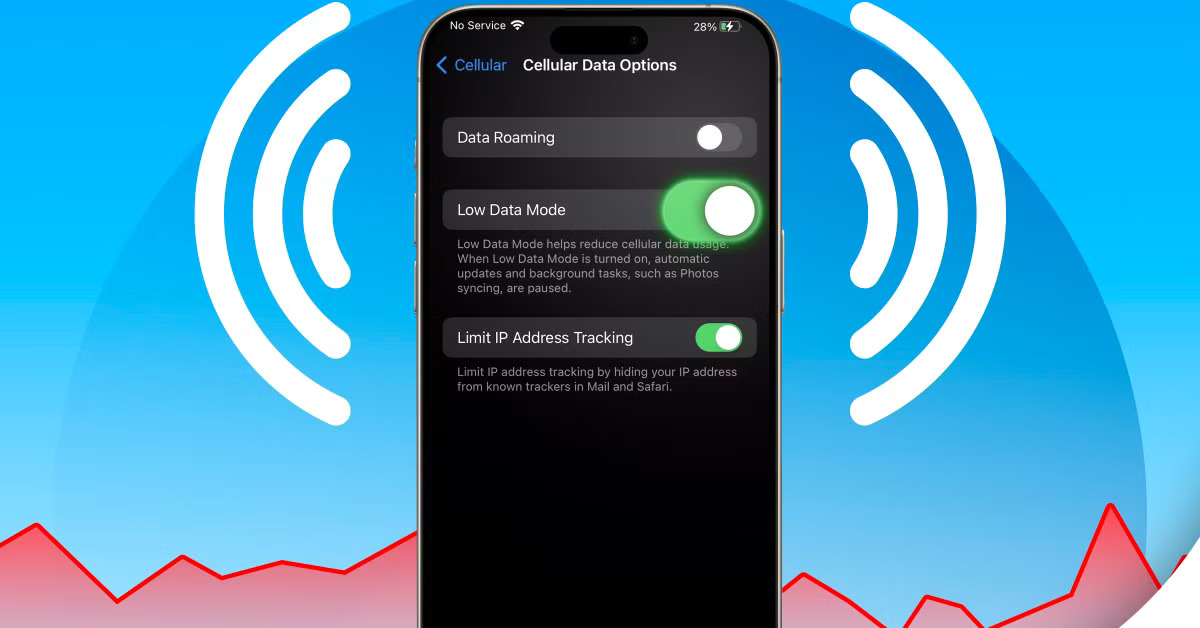
On iPhone, open Settings → Cellular or Mobile Data → Cellular Data Options and look for Low Data Mode. Depending on your connection and setup, it may appear under Data Mode, or you may need to select your SIM first.
Low Data Mode reduces background activity and automatic downloads. Some syncing and backups may pause until normal connectivity resumes.
3. Lower video quality on mobile networks
You do not need the highest resolution for every video, especially on a small screen.
In YouTube, open Settings → Video quality preferences and select Data saver for mobile networks. You can choose a different preference for Wi-Fi.
For individual videos, use the player’s quality controls to select a lower resolution when available. Increase it when you need to read small text or see fine detail.
Apply the same principle to other streaming apps: look for a mobile-data, playback-quality or data-saving option rather than assuming the default is economical.
4. Move app updates to Wi-Fi
On Android, open the Google Play Store → Profile icon → Settings → Network preferences → Auto-update apps, then choose Update over Wi-Fi only.
This helps keep routine updates off your mobile bundle. Google notes that it may still deliver certain updates addressing critical security vulnerabilities regardless of update settings.
Connect to Wi-Fi regularly so updates do not remain postponed indefinitely.
5. Review automatic photo and video backups
Cloud backups can upload large files without you opening the backup app.
In Google Photos on Android, tap your profile picture → Photos settings → Backup → Mobile data usage. Review the available limits and whether videos can back up over mobile data.
Keep backups enabled, but use Wi-Fi for larger uploads when practical. Remember that newly captured files may remain unbacked up until that connection becomes available.
6. Check your results before making more changes
Record your remaining bundle balance, use your phone normally for a few days, then compare consumption over a similar period.
If usage remains high, revisit the apps at the top of your data list. Adjust one setting at a time so you can see what helps without unnecessarily disrupting messages, work or entertainment.
There is no universal percentage saving: the difference depends on your viewing habits, download sizes and how often you connect to Wi-Fi.






ADC appeals ruling that sacked David Mark, urges INEC to hold off
ADC appeals ruling that sacked David Mark and nullified Atiku Abubakar’s presidential nomination, urging INEC to hold off while the...


Kenyan Preacher Jailed 200 Years for Starving 190 Children to Death
Kenyan preacher Paul Mackenzie was sentenced to 200 years in prison for the Shakahola massacre, which left 190 children and...

5 WhatsApp Privacy Settings Worth Checking Today
These five WhatsApp privacy settings help you control who sees your activity, views your profile photo, adds you to groups...


Missing Abia Landlady Found Dead in Neighbour’s 30-Feet Soakaway
A missing landlady was found dead in a 30-foot soakaway pit in her neighbour’s compound in Abia after residents searched...

How to Reduce Mobile Data Usage Without Deleting Your Favourite Apps
Learn how to reduce mobile data usage with simple Android, iPhone and app settings that help your bundle last longer...


Selected but Not Paid? What to Check About Your NERSI Payment
Still waiting for your NERSI payment after receiving a selection message? Check your acceptance status, registered SIM and wallet before...


‘We will be on the ballot’ — Atiku vows to stay in 2027 presidential race after ADC ruling
Atiku vows to stay in the 2027 presidential race after a court ruling affected the ADC’s leadership and his joint...


Jobs, Food Security Top Lagos Economic Plan for 2027 — See Seven Priorities
The Lagos economic plan for 2027 targets jobs, food security, infrastructure and business growth, with seven priorities outlined by the...


‘No Ceasefire’ — Military Speaks On Deal With Boko Haram
The Nigerian military has denied a Boko Haram ceasefire agreement, saying operations against the group, ISWAP and other armed gangs...


NNPC IPO: Oil Giant Eyes Up to 10% Share Sale, Considers London and New York Listings
The proposed NNPC IPO could offer investors between 5% and 10% of the company’s shares, with preparations potentially lasting throughout...