
Education
WAEC Result 2026: How To Check Result Online With Phone, PIN and SMS
Learn how to check WAEC result 2026 online through the WAEC result checker portal, SMS method, e-PIN, serial number and exam number.

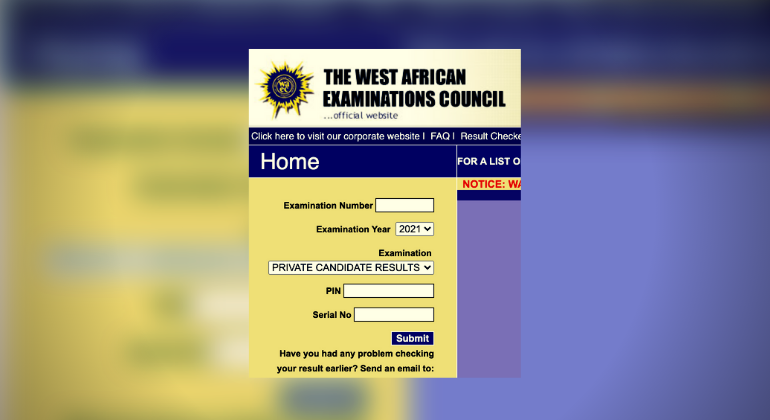
- Learn how to check WAEC result 2026 online through the WAEC result checker portal, SMS method, e-PIN, serial number and exam number.

Candidates can check WAEC result 2026 online using the official WAEC result checker portal. Here is how to check your result with exam number, PIN and SMS.
WAEC Result 2026: How To Check Result Online
WAEC candidates can check their 2026 result through the official WAEC result checker portal once the result is released.
The official result checker portal is:
Candidates should avoid fake result-checking websites or agents asking for extra payment.
Requirements To Check WAEC Result 2026
You need:
- WAEC examination number
- Examination year
- Examination type
- e-PIN
- Serial number
- Internet-enabled phone or computer
Your WAEC examination number is usually a 10-digit number made up of your centre number and candidate number.
How To Check WAEC Result 2026 Online
- Visit waecdirect.org
- Enter your 10-digit WAEC examination number.
- Select examination year, such as 2026.
- Select examination type.
- Enter your e-PIN.
- Enter your serial number.
- Click submit.
- Wait for your result to load.
You can print or screenshot the result for personal use.
How To Check WAEC Result Through SMS
WAEC also provides SMS checking. Use this format:
WAEC*ExamNo*PIN*ExamYear
Send it to 32327.
Example:
WAEC*4250101001*123456789012*2026
Do not leave spaces in the message.
Why WAEC Result May Not Show
Your result may not display if:
- The result has not been released.
- You entered the wrong examination number.
- Your PIN has been used too many times.
- The result is withheld.
- WAEC portal is busy.
- You selected the wrong exam year or exam type.
If your PIN is exhausted, you may need to buy a new result checker token.





BREAKING: Nollywood Actor Francis Duru is Dead, Family Release Statement, Shares Cause of Death
Francis Duru’s family has confirmed his death following a brief illness, as colleagues and fans mourn the veteran Nollywood actor.

One Law for Abba Kyari, No Law for Nnamdi Kanu: Omotosho’s Fourth Jurisdictional Collapse
In Mazi Nnamdi Kanu’s Case, where Kenya was the territorial state, Kenyan sovereignty, comity, and statutory double criminality were utterly...

Ebola in Nigeria: How to Protect Yourself, Symptoms to Watch and Where to Get Help
Following the confirmation of an Ebola case in Abuja, here is essential safety advice for Nigerians, healthcare workers and travellers,...

Ebola: WHO Advises Against Travel, Trade Restrictions After Nigeria Confirms Case
WHO has advised against travel and trade restrictions on Ebola-affected countries as Nigeria monitors 44 contacts following an imported case...

Ebola: Five Things to Know About Bundibugyo Virus as Nigeria Confirms First Case
Nigeria has confirmed an imported Bundibugyo Ebola case in Abuja. Here are five key facts about its symptoms, transmission, treatment...


Italy Rejects 2,220 Nigerians Seeking Asylum
Italy rejected 2,220 Nigerian asylum claims in first-instance decisions in 2025, while 1,175 Nigerians received protection and 4,120 cases remained...


Dangote Buys 25% Stake in Kenya Pipeline Network, Plans $50bn Expansion
Aliko Dangote says his Group has acquired a stake in Kenya’s petroleum pipeline network as it expands fuel distribution infrastructure...


28-Year-Old POS Operator Sentenced to Death by Hanging Over Role in Kidnap Gang
An Imo court has sentenced a 28-year-old POS operator to death over his involvement in the abduction and murder of...


UTME: JAMB Considers Life Skills, Critical Thinking Tests for Admission Seekers
JAMB is considering adding life skills and critical thinking to the UTME, while introducing procedures to help candidates resolve discrepancies...

AAC Writes Tinubu, Demands Aso Rock, Food and Logistics for 5,000 Supporters at Sowore’s Inauguration
The AAC has requested permission to inaugurate Sowore’s presidential campaign council at Aso Rock, asking the Presidency to provide refreshments...